
Kali Linux Tutorial: What is, Install, Utilize Metasploit and Nmap
What is Kali Linux?
Kali Linux is a Security Distribution of Linux specifically designed for digital forensics and penetration testing. It was developed by Mati Aharoni and Devon Kearns of Offensive Security through the rewrite of BackTrack. BackTrack was their previous information security Operating System. The first iteration of Kali Linux was Kali 1.0.0 was introduced in March 2013. Offensive Security currently funds and supports Kalin Linux. If you were to visit Kali's website today (www.kali.org), you would see a large banner stating, "Our Most Advanced Penetration Testing Distribution, Ever." A very bold statement that ironically has yet to be disproven.
Kali Linux has over 600 preinstalled penetration-testing applications to discover. Each program with its unique flexibility and use case. Kali Linux does excellent job separating these useful utilities into the following categories:
- Information Gathering
- Vulnerability Analysis
- Wireless Attacks
- Web Applications
- Exploitation Tools
- Stress Testing
- Forensics Tools
- Sniffing & Spoofing
- Password Attacks
- Maintaining Access
- Reverse Engineering
- Reporting Tools
- Hardware Hacking
Who uses Kali Linux and Why?
Kali Linux is truly a unique operating system, as its one of the few platforms openly used by both good guys and bad guys. Security Administrators, and Black Hat Hackers both use this operating system extensively. One to detect and prevent security breaches, and the other to identify and possibly exploit security breaches. The number of tools configured and preinstalled on the operating system, make Kali Linux the Swiss Army knife in any security professionals toolbox.
Professionals that use Kali Linux
- Security Administrators – Security Administrators are responsible for safeguarding their institution's information and data. They use Kali Linux to review their environment(s) and ensure there are no easily discoverable vulnerabilities.
- Network Administrators – Network Administrators are responsible for maintaining an efficient and secure network. They use Kali Linux to audit their network. For example, Kali Linux has the ability to detect rogue access points.
- Network Architects – Network Architects, are responsible for designing secure network environments. They utilize Kali Linux to audit their initial designs and ensure nothing was overlooked or misconfigured.
- Pen Testers – Pen Testers, utilize Kali Linux to audit environments and perform reconnaissance on corporate environments which they have been hired to review.
- CISO – CISO or Chief Information Security Officers, use Kali Linux to internally audit their environment and discover if any new applications or rouge configurations have been put in place.
- Forensic Engineers – Kali Linux posses a "Forensic Mode", which allows a Forensic Engineer to perform data discovery and recovery in some instances.
- White Hat Hackers – White Hat Hackers, similar to Pen Testers use Kali Linux to audit and discover vulnerabilities which may be present in an environment.
- Black Hat Hackers – Black Hat Hackers, utilize Kali Linux to discover and exploit vulnerabilities. Kali Linux also has numerous social engineer applications, which can be utilized by a Black Hat Hacker to compromise an organization or individual.
- Grey Hat Hackers – Grey Hat Hackers, lie in between White Hat and Black Hat Hackers. They will utilize Kali Linux in the same methods as the two listed above.
- Computer Enthusiast – Computer Enthusiast is a pretty generic term, but anyone interested in learning more about networking or computers, in general, can use Kali Linux to learn more about Information Technology, networking, and common vulnerabilities.
Kali Linux Installation Methods
Kali Linux can be installed using the following methods:
Ways to Run Kali Linux:
- Directly on a PC, Laptop – Utilizing a Kali ISO image, Kali Linux can be installed directly onto a PC or Laptop. This method is best if you have a spare PC and are familiar with Kali Linux. Also, if you plan or doing any access point testing, installing Kali Linux directly onto Wi-Fi enabled laptop is recommended.
- Virtualized (VMware, Hyper-V, Oracle VirtualBox, Citrix) – Kali Linux supports most known hypervisors and can be easily into the most popular ones. Pre-configured images are available for download from www.kali.org, or an ISO can be used to install the operating system into the preferred hypervisor manually.
- Cloud (Amazon AWS, Microsoft Azure) – Given the popularity of Kali Linux, both AWS and Azure provide images for Kali Linux.

- USB Boot Disc – Utilizing Kali Linux's ISO, a boot disc can be created to either run Kali Linux on a machine without actually installing it or for Forensic purposes.
- Windows 10 (App) – Kali Linux can now natively run on Windows 10, via the Command Line. Not all features work yet as this is still in beta mode.

- Mac (Dual or Single boot) – Kali Linux can be installed on Mac, as a secondary operating system or as the primary. Parallels or Mac's boot functionality can be utilized to configure this setup.
Install Kali Linux using Virtual Box
The easiest method and arguably the most widely used is installing Kali Linux and running it from Oracle's VirtualBox.
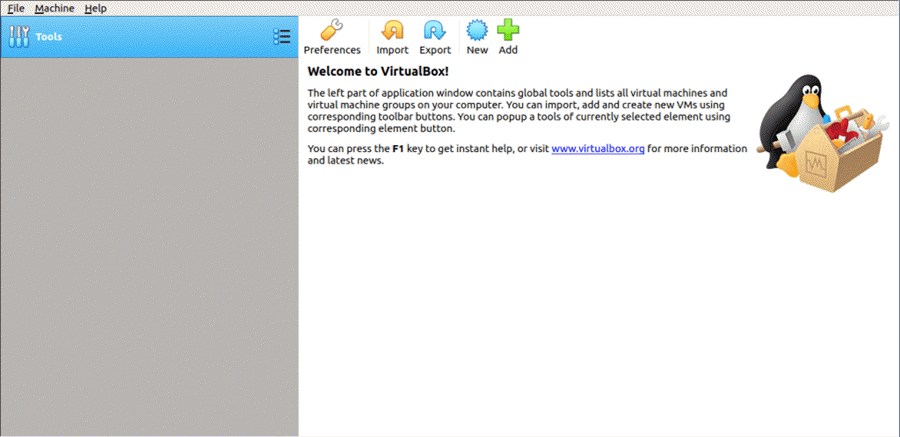
This method allows you to continue to use your existing hardware while experimenting with the featured enriched Kali Linux in a completely isolated environment. Best of all everything is free. Both Kali Linux and Oracle VirtualBox are free to use. This tutorial assumes you have already installed Oracle's VirtualBox on your system and have enabled 64-bit Virtualization via the Bios.
This will download an OVA image, which can be imported into VirtualBox
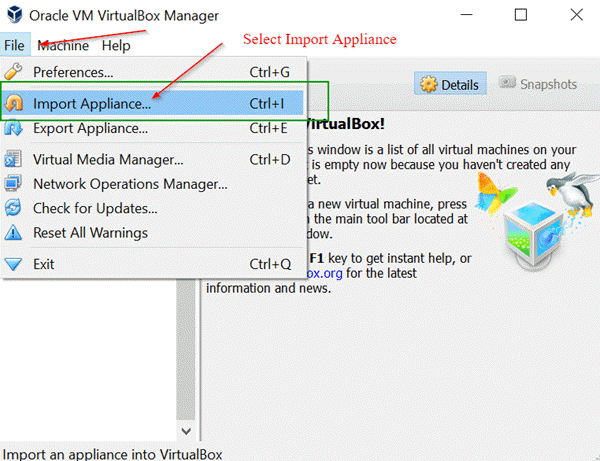
Step 2) Open the Oracle VirtualBox Application, and from the File, Menu select Import Appliance
File Menu -> Import Appliance
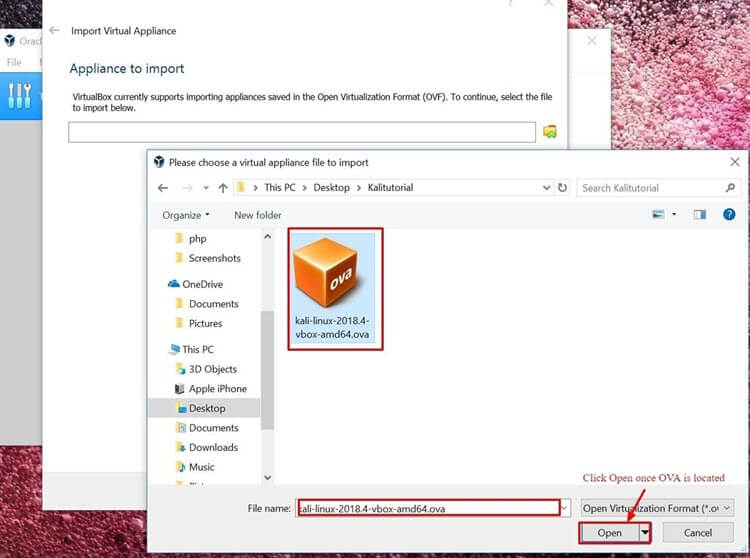
Step 3) On the following screen "Appliance to Import" Browse to the location of the downloaded OVA file and click Open
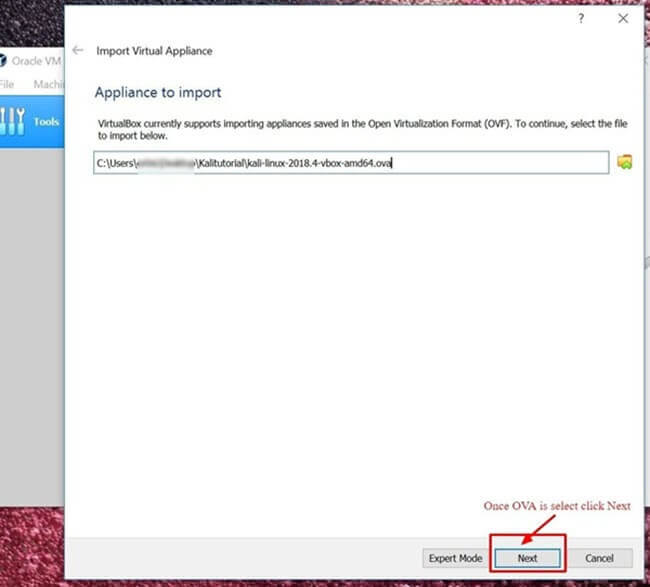
Step 4) Once you click Open, you will be taken back to the "Appliance to Import" simply click Next
Step 5) The following screen "Appliance Settings" displays a summary of the systems settings, leaving the default settings is fine. As shown in the screenshot below, make a note of where the Virtual Machine is located and then click Import.
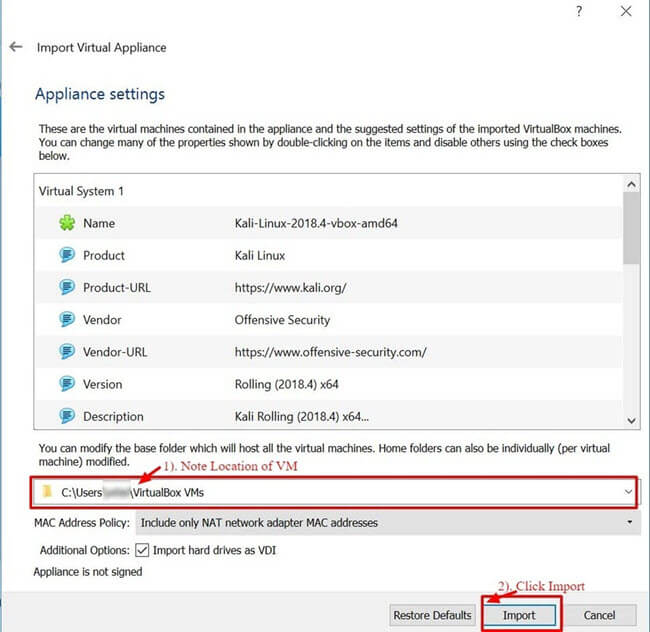
Step 6) VirtualBox will now Import the Kali Linux OVA appliance. This process could take anywhere from 5 to 10 minutes to complete.

Step 7) Congratulations, Kali Linux has been successfully installed on VirtualBox. You should now see the Kali Linux VM in the VirtualBox Console. Next, we'll take a look at Kali Linux and some initial steps to perform.

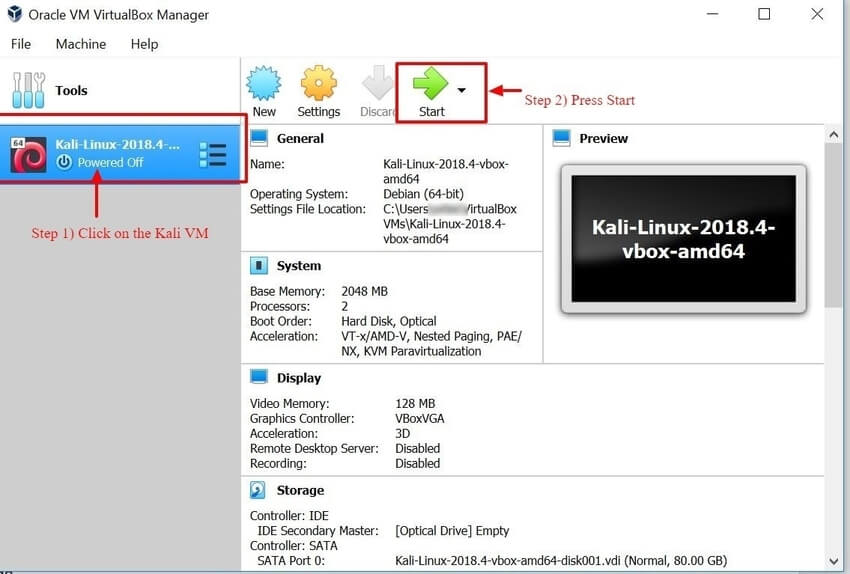
Step 8) Click on the Kali Linux VM within the VirtualBox Dashboard and click Start, this will boot up the Kali Linux Operating System.
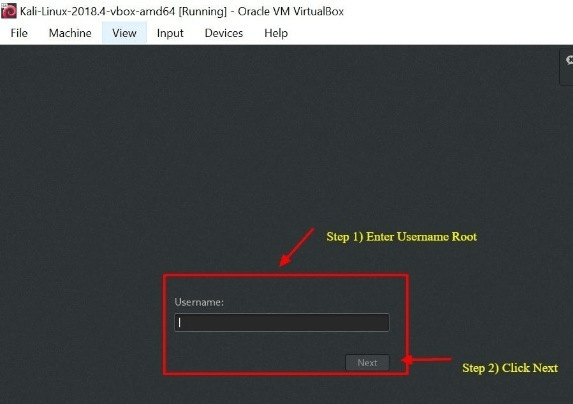
Step 9) On the login screen, enter "Root" as the username and click Next.
Step 10) As mentioned earlier, enter "toor" as the password and click SignIn.
You will now be present with the Kali Linux GUI Desktop. Congratulations you have successfully logged into Kali Linux.

Getting Started with Kali Linux GUI
The Kali Desktop has a few tabs you should initially make a note of and become familiar with. Applications Tab, Places Tab, and the Kali Linux Dock.

Applications Tab – Provides a Graphical Dropdown List of all the applications and tools pre-installed on Kali Linux. Reviewing the Applications Tab is a great way to become familiar with the featured enriched Kali Linux Operating System. Two applications we'll discuss in this tutorial are Nmap and Metasploit. The applications are placed into different categories which makes searching for an application much easier.
Accessing Applications
Step 1) Click on Applications Tab
Step 2) Browse to the particular category you're interested in exploring
Step 3) Click on the Application you would like to start.

Places Tab – Similar to any other GUI Operating System, such as Windows or Mac, easy access to your Folders, Pictures and My Documents is an essential component. Places on Kali Linux provides that accessibility that is vital to any Operating System. By default, the Places menu has the following tabs, Home, Desktop, Documents, Downloads, Music, Pictures, Videos, Computer and Browse Network.
Accessing Places
Step 1) Click on the Places Tab
Step 2) Select the location you would like to access.

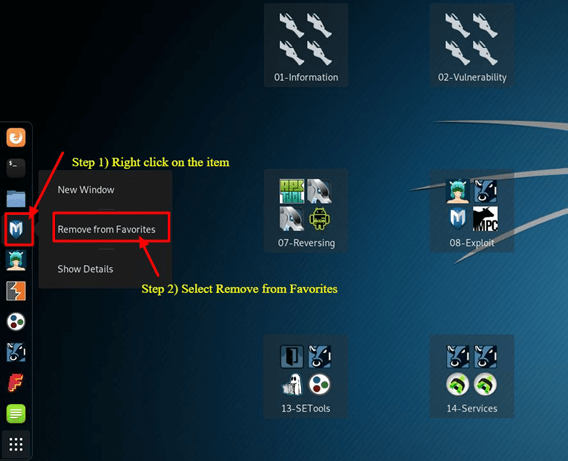
Kali Linux Dock – Similar to Apple Mac's Dock or Microsoft Windows Task Bar, the Kali Linux Dock provides quick access to frequently used / favorite applications. Applications can be added or removed easily.
To Remove an Item from the Dock
Step 1) Right-Click on the Dock Item
Step 2) Select Remove From Favorites
To Add Item to Dock
Adding an item to the Dock is very similar to removing an item from the Dock
Step 1) Click on the Show Applications button at the bottom of the Dock
Step 2) Right Click on Application
Step 3) Select Add to Favorites
Once completed the item will be displayed within the Dock

Kali Linux has many other unique features, which makes this Operating System the primary choice by Security Engineers and Hackers alike. Unfortunately, covering them all is not possible within this tutorial; however, you should feel free to explore the different buttons displayed on the desktop.
What is Nmap?
Network Mapper, better known as Nmap for short is a free, open-source utility used for network discovery and vulnerability scanning. Security professionals use Nmap to discover devices running in their environments. Nmap also can reveal the services, and ports each host is serving, exposing a potential security risk. At the most basic level, consider Nmap, ping on steroids. The more advanced your technical skills evolve the more usefulness you'll find from Nmap
Nmap offers the flexibility to monitor a single host or a vast network consisting of hundreds if not thousands of devices and subnets. The flexibility Nmap offers has evolved over the years, but at its core, it's a port-scanning tool, which gathers information by sending raw packets to a host system. Nmap then listens for responses and determines if a port is open, closed or filtered.
The first scan you should be familiar with is the basic Nmap scan that scans the first 1000 TCP ports. If it discovers a port listening it will display the port as open, closed, or filtered. Filtered meaning a firewall is most likely in place modifying the traffic on that particular port. Below is a list of Nmap commands which can be used to run the default scan.
Nmap Target Selection
Scan a single IP
|
nmap 192.168.1.1
|
Scan a host
|
nmap www.testnetwork.com
|
Scan a range of IPs
|
nmap 192.168.1.1-20
|
Scan a subnet
|
nmap 192.168.1.0/24
|
Scan targets from a text file
|
nmap -iL list-of-ipaddresses.txt
|
How to Perform a Basic Nmap Scan on Kali Linux
To run a basic Nmap scan in Kali Linux, follow the steps below. With Nmap as depicted above, you have the ability to scan a single IP, a DNS name, a range of IP addresses, Subnets, and even scan from text files. For this example, we will scan the localhost IP address.
Step 1) From the Dock menu, click on the second tab which is the Terminal
Step 2) The Terminal window should open, enter the command ifconfig, this command will return the local IP address of your Kali Linux system. In this example, the local IP address is 10.0.2.15
Step 3) Make a note of the local IP Address
Step 4) In the same terminal window, enter nmap 10.0.2.15, this will scan the first 1000 ports on the localhost. Considering this is the base install no ports should be open.
Step 5) Review results

By default, nmap only scans the first 1000 ports. If you needed to scan the complete 65535 ports, you would simply modify the above command to include -p-.
Nmap 10.0.2.15 -p-
Nmap OS Scan
Another basic but useful feature of nmap is the ability to detect the OS of the host system. Kali Linux by default is secure, so for this example, the host system, which Oracle's VirtualBox is installed on, will be used as an example. The host system is a Windows 10 Surface. The host system's IP address is 10.28.2.26.
In the Terminal window enter the following nmap command:
nmap 10.28.2.26 – A
Review results
Adding -A tells nmap to not only perform a port scan but also try to detect the Operating System.

Nmap is a vital utility in any Security Professional toolbox. Use the command nmap -h to explore more options and commands on Nmap.
What is Metasploit?
The Metasploit Framework is an open source project that provides a public resource for researching vulnerabilities and developing code that allows security professionals the ability to infiltrate their own network and identify security risk and vulnerabilities. Metasploit was recently purchased by Rapid 7 (https://www.metasploit.com). However, the community edition of Metasploit is still available on Kali Linux. Metasploit is by far the world's most used Penetration utility.
It is important that you are careful when using Metasploit because scanning a network or environment that is not yours could be considered illegal in some instances. In this tutorial, we'll show you how to start Metasploit and run a basic scan on Kali Linux. Metasploit is considered an advance utility and will require some time to become adept, but once familiar with the application it will be an invaluable resource.
Metasploit and Nmap
Within Metasploit, we can actually utilize Nmap. In this case, you'll learn how to scan your local VirtualBox subnet from Metasploit using the Nmap utility we just learned about.
Step 1) On the Applications Tab, scroll down to 08-Exploitation Tools and then select Metasploit
Step 2) A terminal box will open, with MSF in the dialog, this is Metasploit
Step 3) Enter the following command
db_nmap -V -sV 10.0.2.15/24
(be sure to replace 10.0.2.15 with your local IP address)
Here:
db_ stands for database
-V Stands for verbose mode
-sV stands for service version detection

Metasploit Exploit Utility
Metasploit very robust with its features and flexibility. One common use for Metasploit is the Exploitation of Vulnerabilities. Below we'll go through the steps of reviewing some exploits and trying to exploit a Windows 7 Machine.
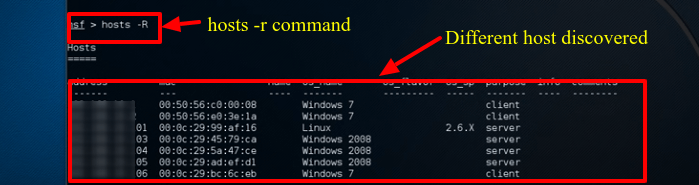
Step 1) Assuming Metasploit is still open enter Hosts -R in the terminal window. This adds the hosts recently discovered to Metasploit database.
Step 2) Enter "show exploits", this command will provide a comprehensive look at all the exploits available to Metasploit.

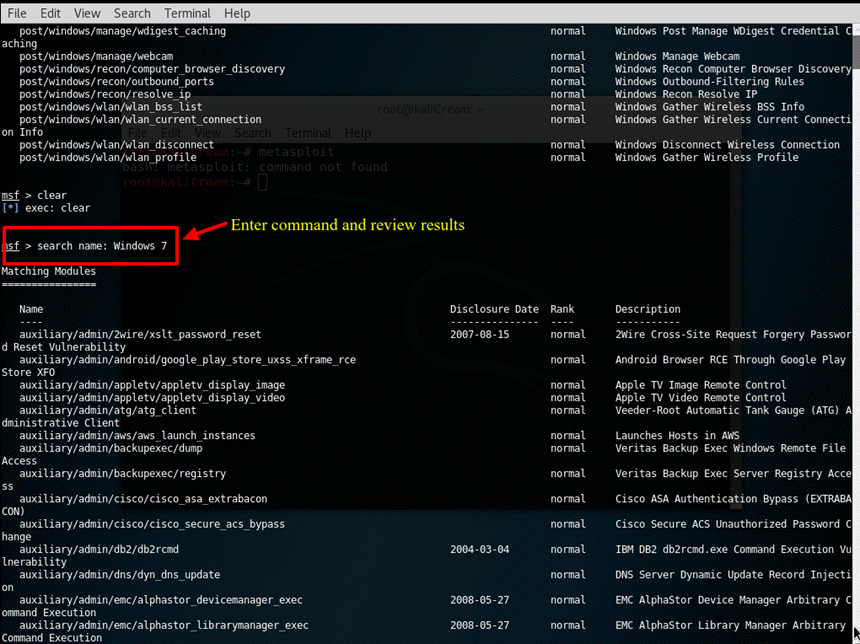
Step 3) Now, try to narrow down the list with this command: search name: Windows 7, this command searches the exploits which specifically include windows 7, for the purpose of this example we will try to exploit a Windows 7 Machine. Depending on your environment, you will have to change the search parameters to meet your criteria. For example, if you have Mac or another Linux machine, you will have to change the search parameter to match that machine type.
Step 4) For the purposes of this tutorial we will use an Apple Itunes vulnerability discovered in the list. To utilize the exploit, we must enter the complete path which is displayed in the list: use exploit/windows/browse/apple_itunes_playlist

Step 5) If the exploit is successful the command prompt will change to display the exploit name followed by > as depicted in the below screenshot.
Step 6) Enter show options to review what options are available to the exploit. Each exploit will, of course, have different options.

Summary
In sum, Kali Linux is an amazing operating system that is widely used by various professionals from Security Administrators, to Black Hat Hackers. Given its robust utilities, stability, and ease of use, it's an operating system everyone in the IT industry and computer enthusiast should be familiar with. Utilizing just the two applications discussed in this tutorial will significantly aid a firm in securing their Information Technology infrastructure. Both Nmap and Metasploit are available on other platforms, but their ease of use and pre-installed configuration on Kali Linux makes Kali the operating system of choice when evaluating and testing the security of a network. As stated previously, be careful using the Kali Linux, as it should only be used in network environments which you control and or have permission to test. As some utilities, may actually cause damage or loss of data.


Follow Us
Were this world an endless plain, and by sailing eastward we could for ever reach new distances